
Extending WebAPI with a Model Context Protocol (MCP) Server: A Hybrid Approach
As applications grow more intelligent—especially those powered by large language models (LLMs)—Web APIs must evolve beyond simple request-response patterns. Traditional REST APIs are great for structured, stateless interactions, but they struggle to support the rich, adaptive conversations that LLMs and modern user experiences demand.
5/11/20254 min read
If you have an existing Api or building a new one which needs to function both as an WebAPI and need a more structured, scalable way to expose your domain logic—particularly for clients that demand a more context-aware and efficient interaction model. Rather than rewriting or replacing WebAPI, we can enhace it by adding a Model Context Protocol (MCP) server alongside it. This allows us to leverage our existing API infrastructure while layering in a more expressive protocol that maps closely to domain models and use cases. In this post, we’ll explore how we architected the MCP server on top of our current WebAPI setup, how we structured the code to separate concerns cleanly, and what this hybrid approach offers in terms of maintainability, reusability, and future scalability.
Before we dive into technical details of the implementation, Let's take a brief look at
What is Model Context Protocol, and Do we need one?
In today’s rapidly evolving AI landscape when building complex GenAI systems — think multi-agent workflows, RAG pipelines, or tools interacting with LLMs — we need a reliable and interpretable way to pass “context” into models. Modern AI applications rely on intricate systems:
Tool use (e.g., APIs, search, plugins)
Memory (long-term, short-term)
Retrieval-augmented generation (RAG)
User state, preferences, history
Chain-of-thought reasoning
Multi-step agents
Whether it’s accessing APIs, managing memory across sessions, or adapting to a user’s preferences and history, each component in the stack needs structured, meaningful context to function effectively. Despite this complexity, we still rely on a blunt instrument: stuffing everything into a prompt. This approach may work at a small scale, but it quickly becomes brittle and opaque as systems grow. That’s where Model Context Protocol (MCP) comes in—offering a standardized, interpretable way to define and pass context through every part of a GenAI system. It’s a move from chaotic prompt engineering to clean, composable architecture.
Understanding the Model Context Protocol (MCP): Architecture and Key Components
This post breaks down the core components of MCP—Hosts, Clients, Servers, and Resources—and explains how they work together to create intelligent, tool-augmented AI systems.
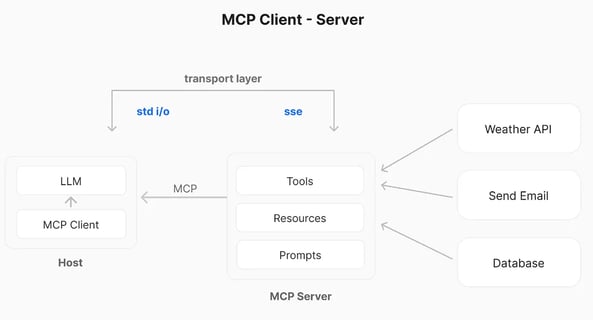
MCP Host: The AI Runtime Environment
The MCP Host is the central LLM-driven application responsible for managing user interactions and coordinating communication with external services.Think of the Host as the AI “brain” managing the session, deciding when and how to retrieve contextual information.
Responsibilities:
Manages the conversation lifecycle and user experience.
Interprets and routes user prompts or LLM intentions.
Orchestrates calls to MCP Clients for external data or tool access.
MCP Client: The Translator and Dispatcher
The MCP Client lives within the Host and acts as the bridge to the outside world. It interprets the LLM’s structured requests and translates them into messages that can be sent to MCP Servers.For example, if the LLM needs to fetch user profile data from a CRM, the Client transforms that intent into a proper MCP request and sends it to the relevant server.
Responsibilities:
Translates AI-generated intents into well-formed MCP requests.
Handles authentication, serialization, and error handling.
Parses responses from MCP Servers and returns usable data to the Host.
MCP Server: Lightweight Functional Interfaces
MCP Servers expose specific capabilities (tools, data, or functions) via a well-defined protocol. They act as wrappers or intermediaries, allowing MCP Clients to access local or remote systems in a structured and consistent way.Servers are loosely coupled and domain specific. For instance, you might have separate MCP Servers for handling emails, databases, and analytics tools.
Responsibilities:
Implement functionality such as calling APIs, querying databases, or accessing files.
Translate protocol-compliant requests into backend actions.
Return standardized responses with structured data and optional metadata.
Resources: The External Systems
Behind each MCP Server is a resource—an actual API, database, file system, or tool that contains the data or functionality being accessed.
Examples of Resources:
RESTful APIs (e.g., weather, finance, CRM)
SQL/NoSQL databases
File storage systems
Computational tools or scripts
MCP enables seamless access to these resources through standardized interfaces, simplifying tool integration in LLM workflows.
How It All Works Together
A user interacts with the MCP Host (e.g., via a chat or autonomous agent).
The LLM infers that external data is needed (e.g., a file lookup or API query).
The MCP Client formats this intent into a structured request.
The request is sent to an appropriate MCP Server.
The Server queries the underlying Resource and returns the result.
The Client parses and delivers the result back to the Host, which incorporates it into the model’s response.
Enhacing API as MCP Server
All the below described code base is available at Github repo: mcp
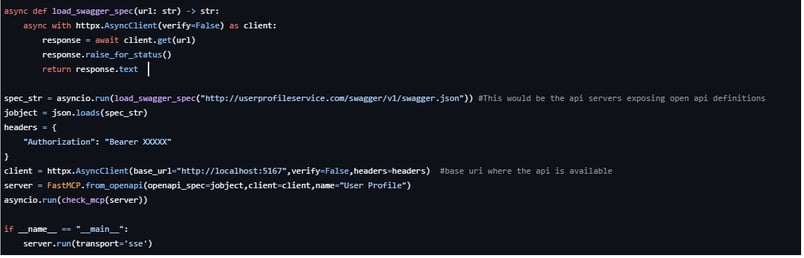
We are using FastMCP python SDK to convert the OpenAPI definition of the routes available in a webAPI to an MCP standarad Tools,Resources and Resource template. load_swagger_spec function extracts the OpenAPI definition using a published swagger json File. Then we create basic httpx client using the base uri and any additional headers required for authentication/authorization. we use the FastMCP.from_openapi with all this details to create a mcp server instance. we run a sample to check if mcp server is pulling all the relevant details. In this example we are using sse as our transport protocol.
We have two ways of making an mcp server up and running
Running using python for ex: python server.py
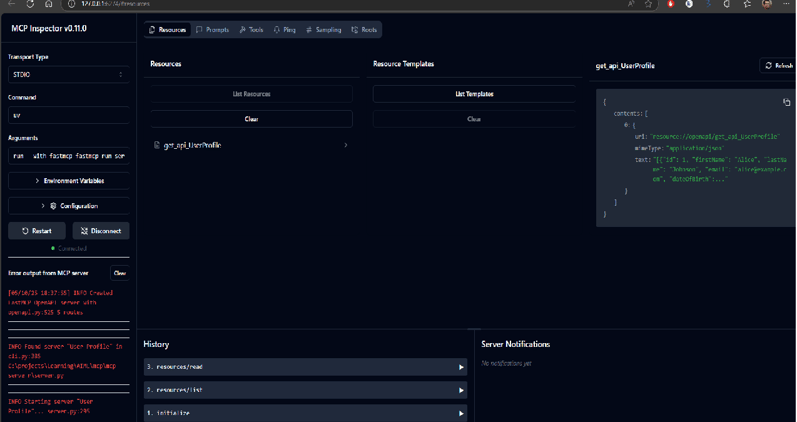
Using fastmcp cli to run or debug for ex: fastmcp dev/run server.py, which will open a fastmcp inspector for testing your mcp server
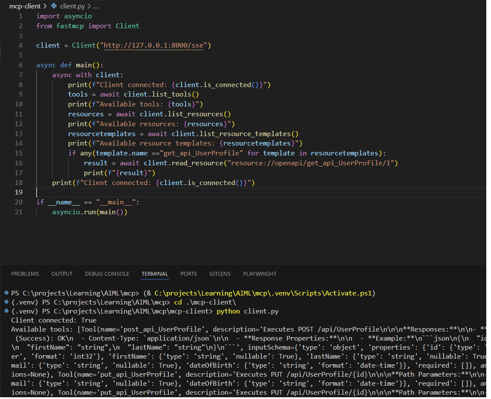
with the above steps once the server is up and running, we can use the mcp client to connect to this server as per below code snippet
In the next part we will take a deep dig at how we integrate MCP Server with an AI Agent/LLM to see an end-to-end picture of how the user interactions turns to a streamlined process of determining how and what calls to be made and retrieve data and make decisions on it.
© 2024. All rights reserved.